Built for hams, by a ham.
Every feature here is live in the beta today. Items still in development live in the roadmap, not on this page.
One pane of glass — customised your way
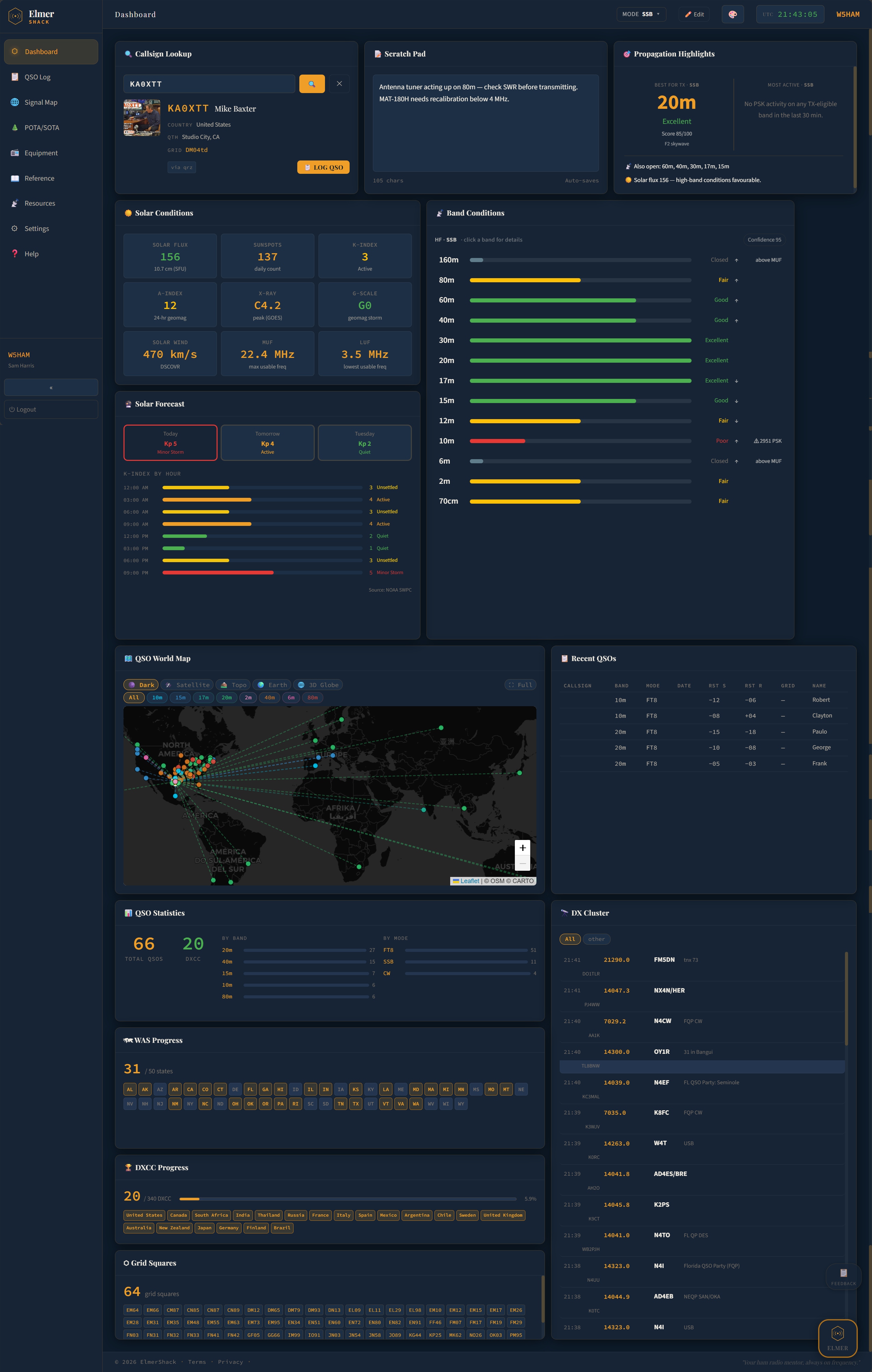
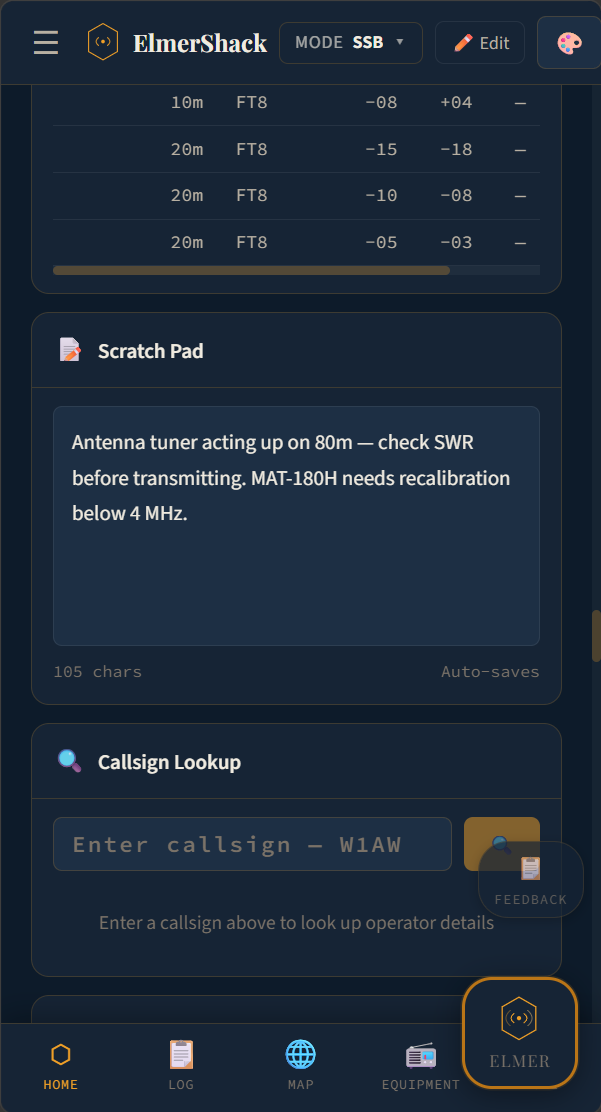
The dashboard is a live grid of cards: solar conditions, the band-by-band forecast, your QSO map, your stats, your DX cluster, your scratch pad, and more. Drag any card to move it, drag a corner to resize, click ✕ to hide it. Click Edit to enter edit mode; click Save Layout when you're done.
- Built on react-grid-layout — smooth drag, snap, and resize
- Per-user layout saved server-side, follows you between devices
- 17 cards available today — show what matters, hide the rest
- Hidden cards live in a tray you can restore from at any time
- Add admin-set defaults so new users land on a sensible starting layout
- A separate accessibility-first Screen Reader Dashboard for users who prefer semantic stacks over a visual grid
Callsign lookup with one-click logging
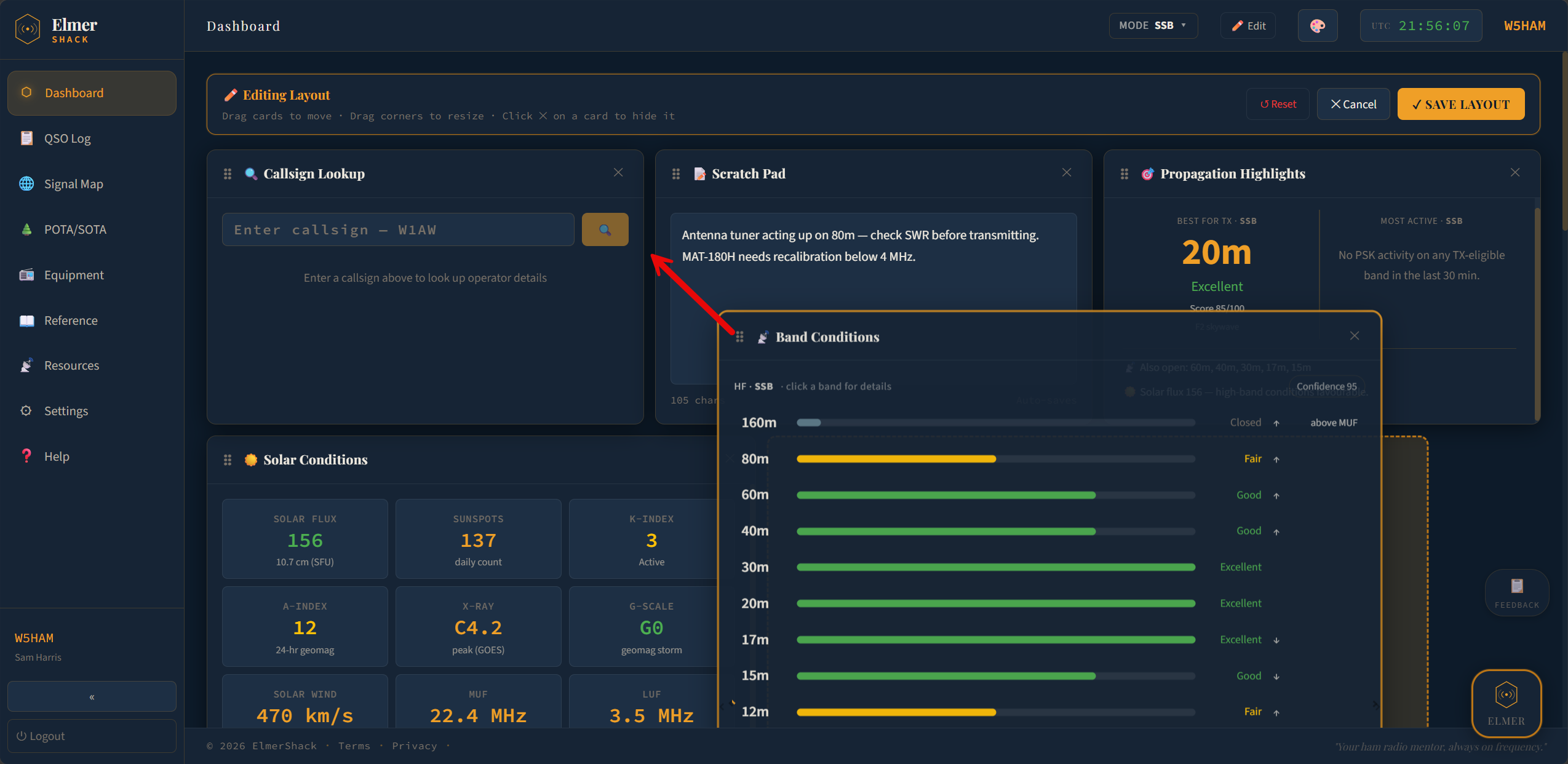
Type a callsign on the dashboard, press Enter, and ElmerShack returns the operator's name, QTH, grid square, license class, country, email, and photo (when available). Sources: QRZ XML or HamQTH — your choice. Credentials are encrypted at rest with AES-256-GCM.
- Live lookup against QRZ or HamQTH using your credentials
- Result includes name, QTH, grid, license class, country, email, photo
- Server-side cache so repeat lookups don't hammer the upstream
- Log QSO button on the result — opens a pre-filled add-QSO modal in one click
- Standalone Lookup page if you want a bigger view
Live solar conditions, straight from NOAA
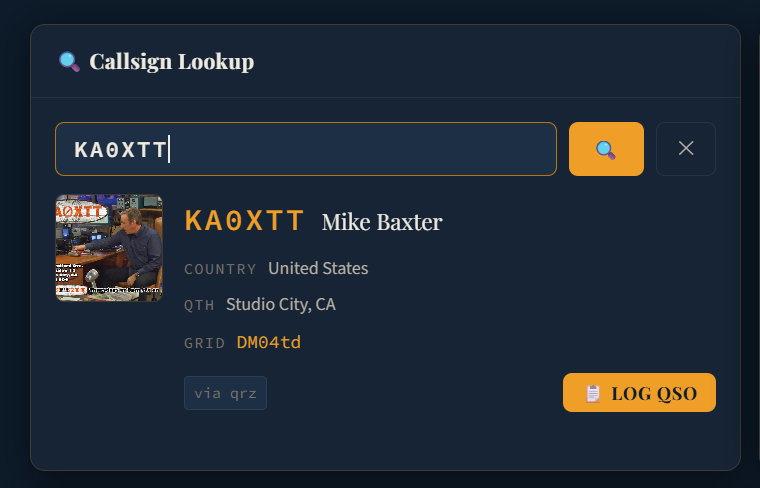
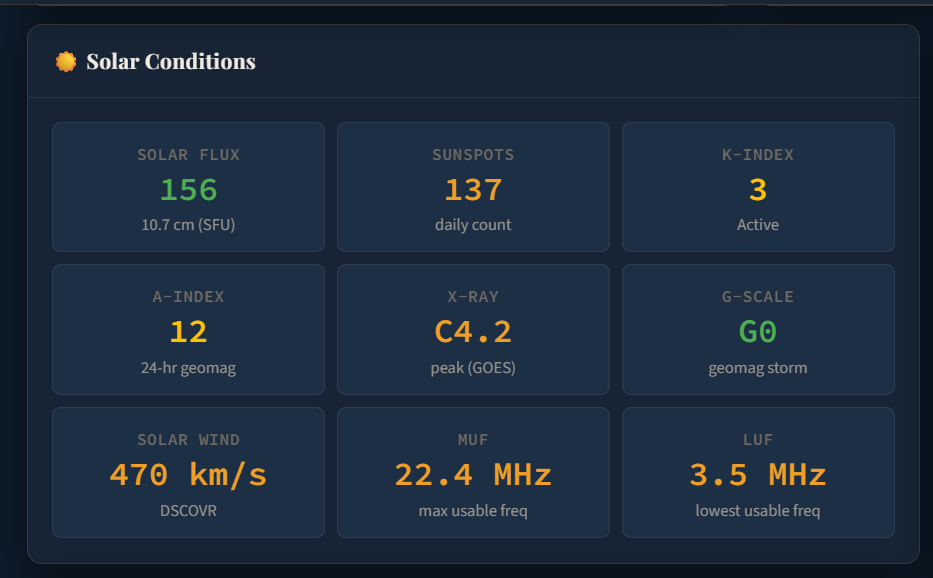
The Solar Conditions card pulls from NOAA SWPC and refreshes automatically. Solar Flux Index (SFI) is the 10.7 cm radio flux that proxies for ionization; K-index measures geomagnetic disturbance over a 3-hour window; A-index is the 24-hour rolling average. X-ray flux class flags solar flares. Solar wind speed comes from DSCOVR. MUF and LUF tell you the maximum and lowest usable frequencies for the current ionosphere.
- SFI · K · A · X-ray class · Sunspots · Solar wind (km/s) · Bz (when present)
- G-scale geomagnetic storm badge (G0–G5) when conditions warrant
- MUF and LUF surfaced as first-class numbers, not buried in a table
- Refresh cadence shortens during K≥4 storms so you see things sooner
- Failsafe: if NOAA is unreachable, the card says so honestly rather than showing stale data as fresh
Physics-backed band conditions, mode-aware
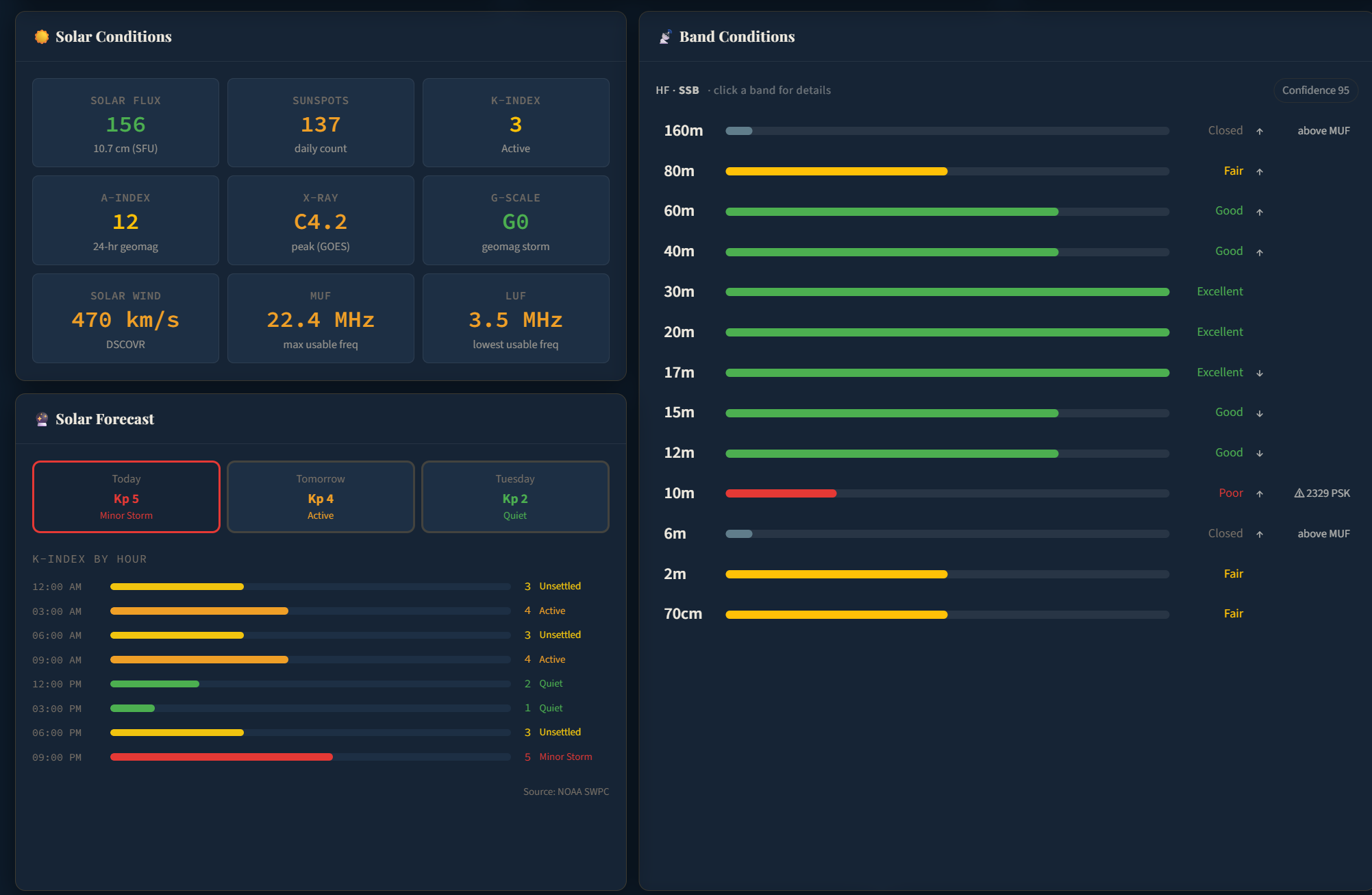
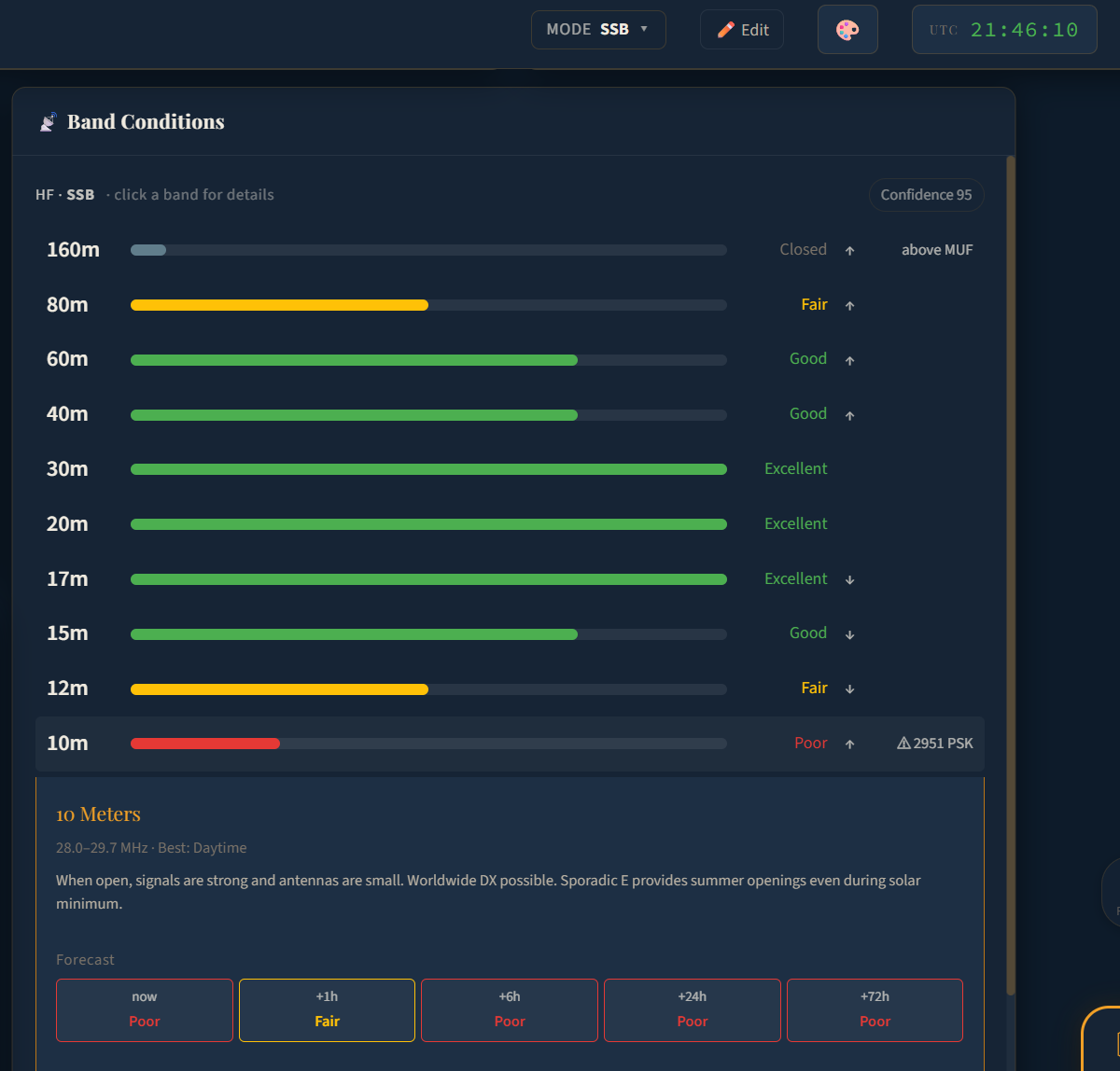
Most ham apps show "good / fair / poor" cooked up from the K-index alone. ElmerShack runs an actual ionospheric physics model — IRI-2020 via a self-hosted propcalc microservice — over a 36-path fan and six modes per band. That gives you mode-aware ratings for every band from 160m to 70cm, with the empirical PSK Reporter feed acting as a safety net for any band the physics under-predicts.
- HF (160m–10m + 6m) — F2 propagation from IRI-2020, sporadic-E climatology overlay (so 10m doesn't read "Closed" during Es season), Kp-driven storm modifiers depressing MUF and adding D-region absorption
- VHF / UHF (2m / 70cm) — climatological tropo-ducting model with live numerical-weather-prediction profile data when available; local FM never shows as "Closed"
- Mode-aware scoring — pick CW, SSB, FT8, FT4, FM, or RTTY at the top of the card; FT8 is typically rated 20+ dB more open than SSB on the same band
- Forecast horizons — every band carries +1h / +6h / +24h / +72h projections so you can plan the next opening, not just the next minute
- Confidence score — every reading carries a 0–95 confidence with a penalty breakdown (storm, missing data, model-limitation), surfaced as a tooltip badge
- Empirical safety net — when physics says Closed but ≥500 stations are working a band, the rating bumps so you don't miss a real opening
- Drill-down — click any band for the full effects panel: best-time-of-day, MUF margin, sporadic-E probability, tropo duct strength, recent PSK activity
Solar & band forecast — three days out
The Solar Forecast card lets you tab through Today, Tomorrow, and the day after. Each tab shows the predicted Kp number with a label (Quiet, Unsettled, Active, Minor Storm…) plus a K-INDEX BY HOUR bar chart so you can see the disturbance arc — when conditions soften, when they spike, when the bands are likely to come back.
- Three-day clickable tabs with predicted Kp and storm class
- Hourly K-index bars, color-coded by activity level
- Today tab falls back to observed Kp values when the forecast hasn't filled in yet
- Source attribution surfaced honestly (NOAA SWPC)
QSO map, signal map, 3D globe
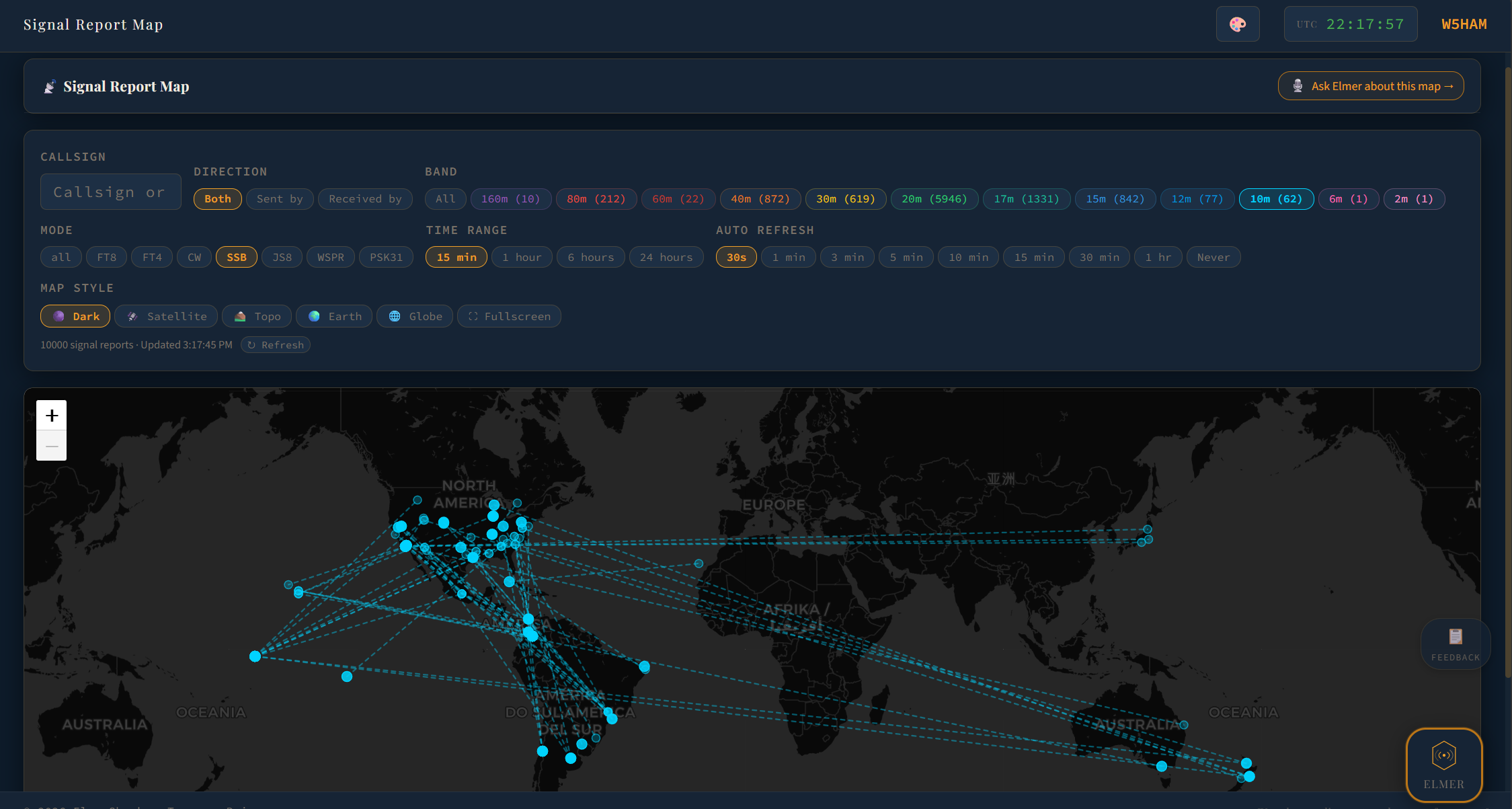
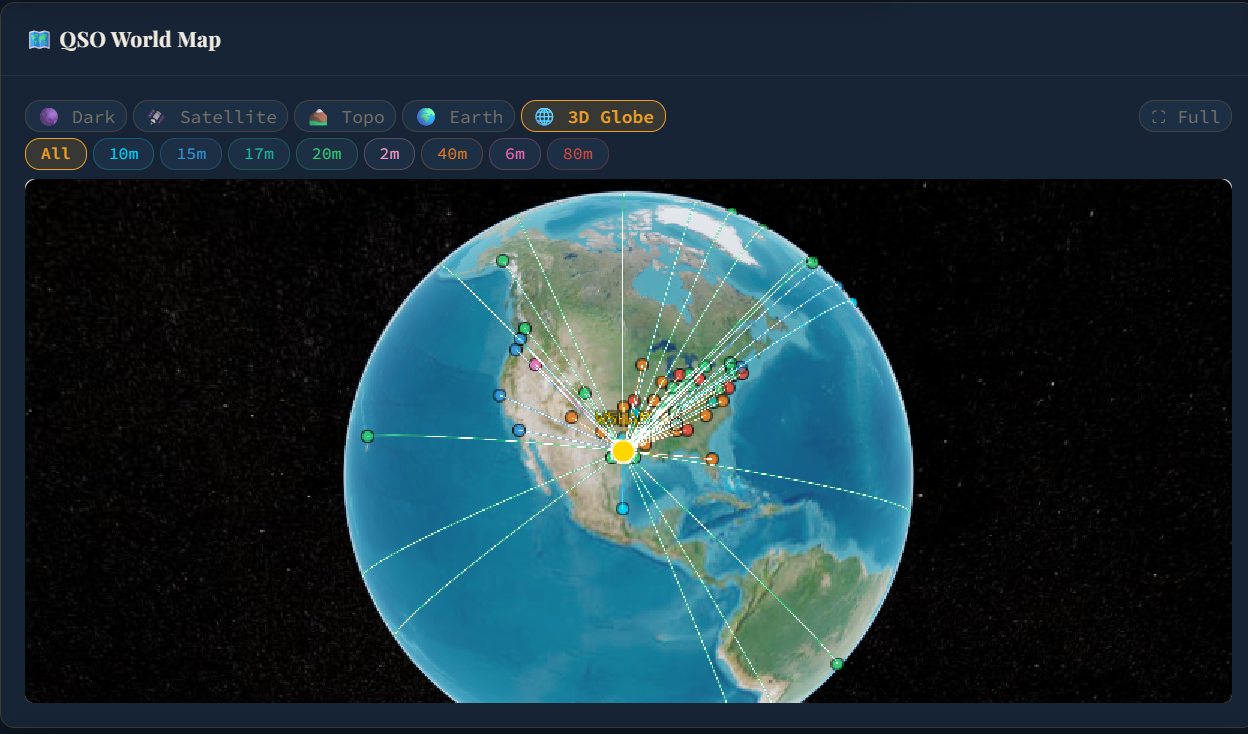
Two live maps in one app. The QSO World Map plots every contact you've ever logged with band-colored dots. The Signal Report Map shows live PSK Reporter activity from around the world right now — a great sanity check on whether your antenna is actually getting out, and what the bands really are doing versus what they should be doing.
- QSO World Map — every logged contact, band-colored, with great-circle paths
- Filter by band — isolate 20m, 40m, or any other band
- Signal Report Map — live PSK Reporter feed via persistent MQTT (no rate limits, no polling)
- Direction filter: Sent by you · Received by you · Both
- Band, mode, and time-range filter chips with live spot counts
- Map styles: Dark · Satellite · Topo · Earth — and a 3D globe
- 3D globe built on self-hosted CesiumJS 1.114 — no external CDN at runtime
- 2-hour rolling window, dedup'd by sender + receiver + band + mode so every distinct path shows
- "Ask Elmer about this map" jump button — drops the current view into Elmer for analysis
QSO log — manual, ADIF, and QRZ in one
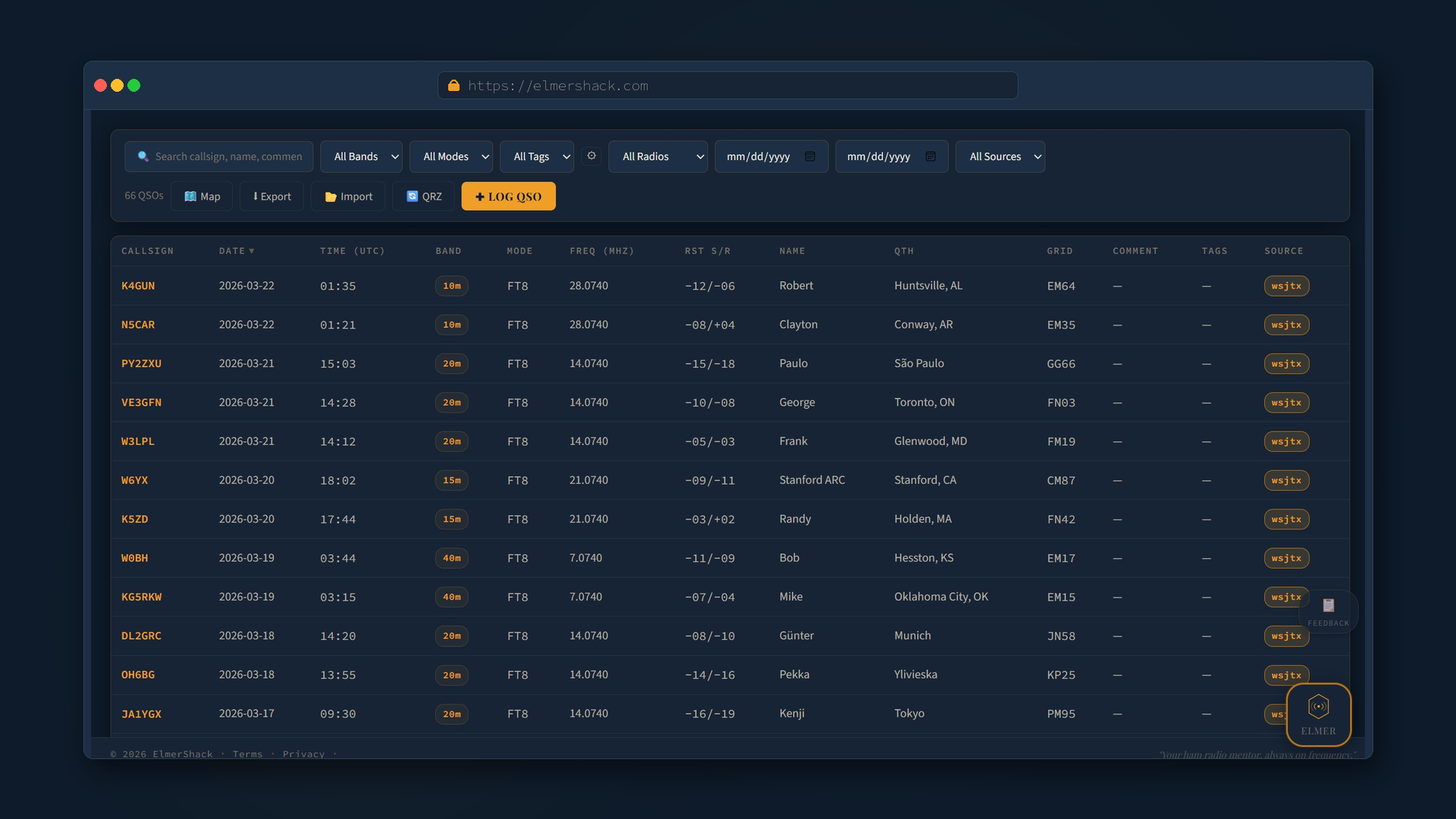
The log is the heart of every shack. ElmerShack's log handles manual entry, ADIF import from any logging program (WSJT-X, JS8Call, fldigi, generic), ADIF export, and bidirectional QRZ logbook sync. Add a QSO from the dashboard's Callsign Lookup, from the log page, from an import — they all flow into the same place.
- Full QSO record: date / time / band / mode / RST sent & received / name / QTH / grid / country / power / notes
- Equipment per QSO — pick which radio and which antenna you used; Elmer reads this
- Filters: search by callsign or text · band · mode · tag · date range · source · activation
- Source labels:
manual,wsjtx,qrz,import— so you can audit where every contact came from - ADIF import from WSJT-X / JS8Call / fldigi / generic ADIF — applies a default radio, antenna, and tags to every QSO in the file
- ADIF export for backup, LoTW upload, or transfer — full log or filtered by tag
- QRZ sync — push contacts to your QRZ logbook automatically and pull existing QRZ entries down
- QRZ multi-logbook — register more than one logbook key with tag-based routing (e.g. tagged
contestQSOs go to your contest logbook) - Re-import dedup so you can ingest the same ADIF twice without doubling rows
Tag every QSO — one log, infinite slices
Tags replace the usual mess of "I need a separate logbook for contests / portable / Field Day." Apply any text labels you want to a QSO, filter the log by tag, export only tagged contacts, route tagged QSOs to a specific QRZ logbook. The intent: keep one source of truth, slice it however you need.
- Add tags from the Add QSO modal or the import dialog
- Bulk tag — select multiple rows and apply or remove tags in one action
- Tag chips at the top of the log filter the table
- Tag-filtered ADIF export — perfect for uploading just your contest QSOs
- QRZ multi-logbook routing reads tags so the right contacts land in the right QRZ logbook
Your shack on file — and feeding everything
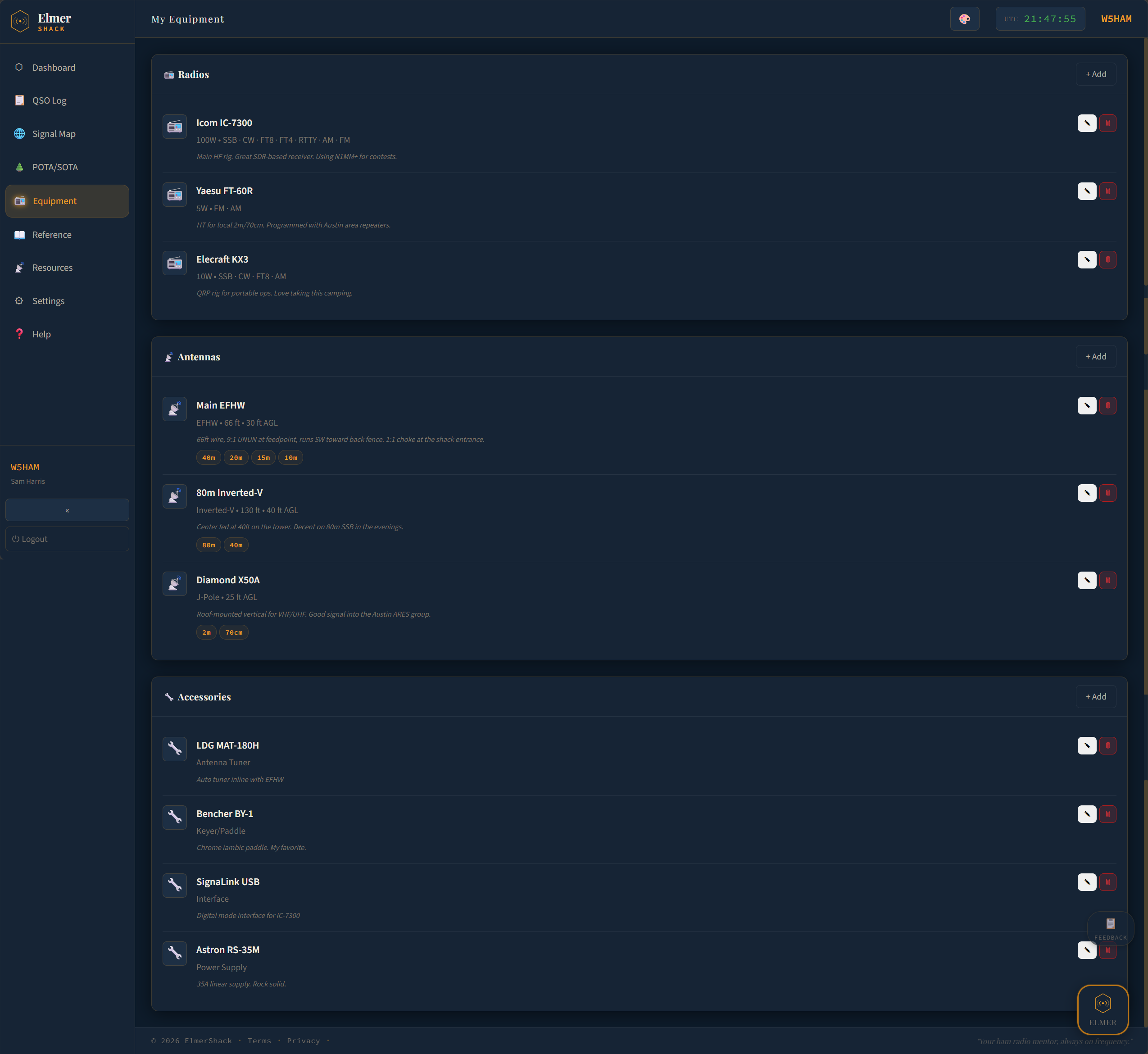
Add every radio, antenna, and accessory in your shack. Pair an antenna to a radio so ElmerShack knows what's actually connected. The antenna physics engine derives resonant bands from wire length for EFHW, Dipole, Inverted-V, Vertical, Yagi, Loop, J-Pole, Mag Loop, and Random Wire — those bands show as chips on the antenna, and Elmer reads them when he gives advice.
- Radios — make · model · power output · supported modes · notes
- Antennas — type · wire length · feed height · description · calculated resonant bands as chips
- Accessories — tuners, keyers, interfaces, power supplies, anything in the shack
- Pair an antenna to a radio — Elmer treats that as "this antenna is the connected one" when reasoning
- Imperial / metric units auto-detected from your timezone, switchable in Settings
- Equipment pulls into the QSO log so you can pick "which rig and antenna for this contact"
- Elmer's prompt explicitly references your gear by name — "your IC-7300 with the EFHW," not "your radio with the antenna"
Live DX cluster on the dashboard
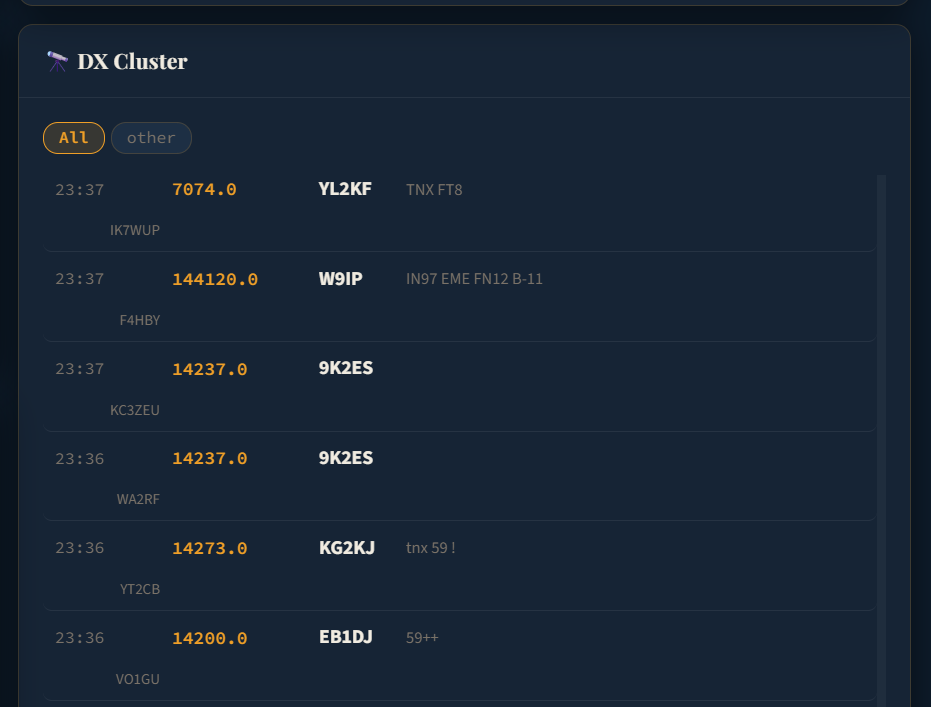
The DX Cluster card shows live spots so you don't need a second tab open. Spots are stamped with UTC time, sorted newest-first. Stale-cache fallback means a brief upstream blip doesn't blank the card — you'll see the data plus an "older than usual" indicator instead.
- Live cluster spots fed to the dashboard card
- Stale-cache fallback so brief upstream issues don't wipe the card
- UTC timestamp on every spot — no timezone confusion
QSO & DX statistics, awards in real time
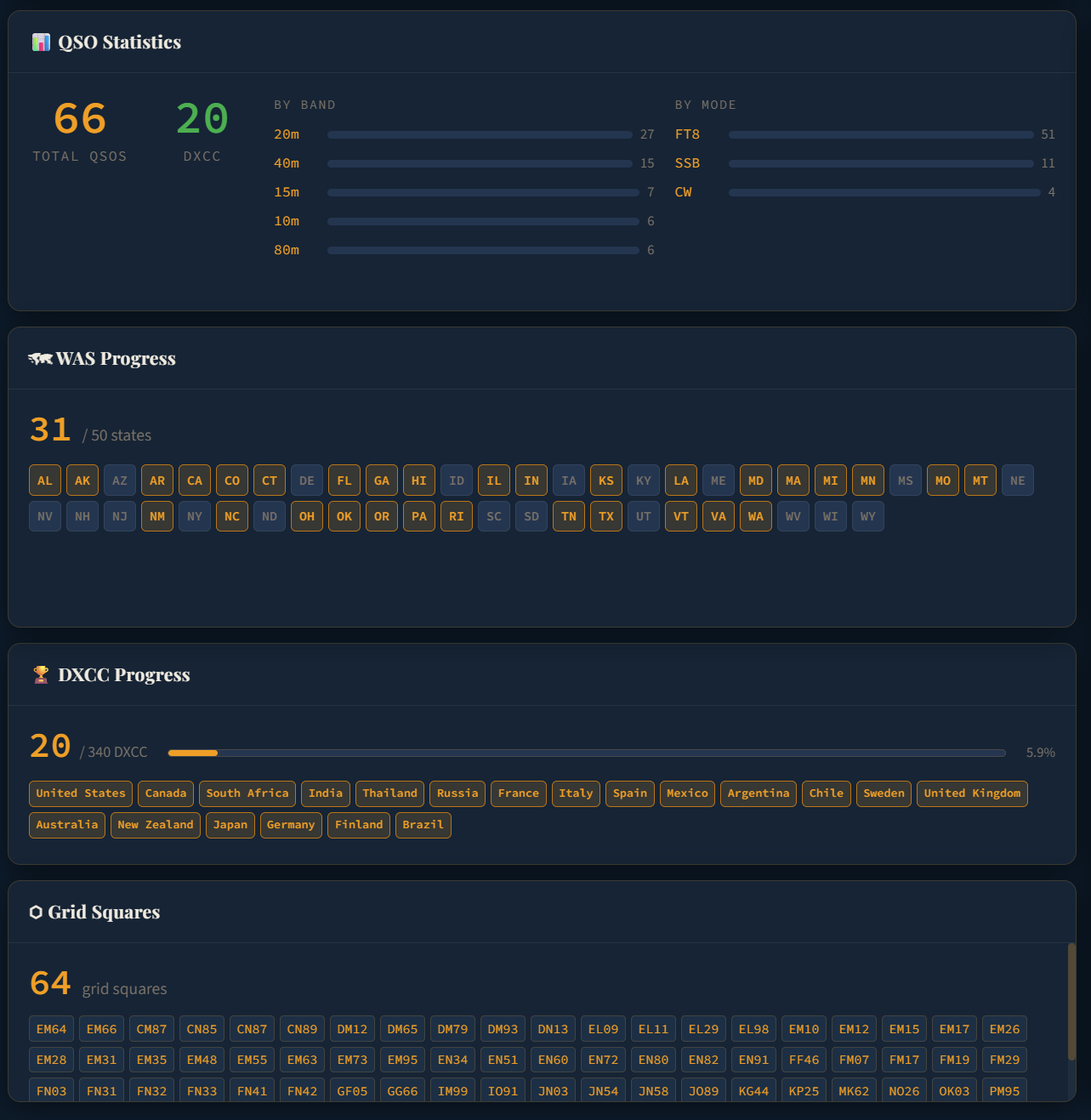
The QSO Statistics card shows totals plus per-band and per-mode breakdowns. WAS Progress tracks all 50 US states with a color-coded grid (auto-derived from grid square or manual state field). DXCC Progress counts entities worked out of 340. Grid Squares lists every Maidenhead grid you've contacted. All four update the moment you log a QSO — no manual refresh, no overnight batch.
- Total QSOs · Unique DXCC entities · By-band breakdown · By-mode breakdown
- WAS — color-coded 50-state grid with worked / not-worked at a glance
- DXCC — worked out of 340 with progress bar and country chips
- Grid Squares — every Maidenhead locator you've ever logged
- Propagation Insights card — 5 tabs of analytics: best hours, band trends, DX breakdown, weekly trend, personal bests
- Backfill helper for older logs that have a grid but no state field
Reference library & CW practice tool
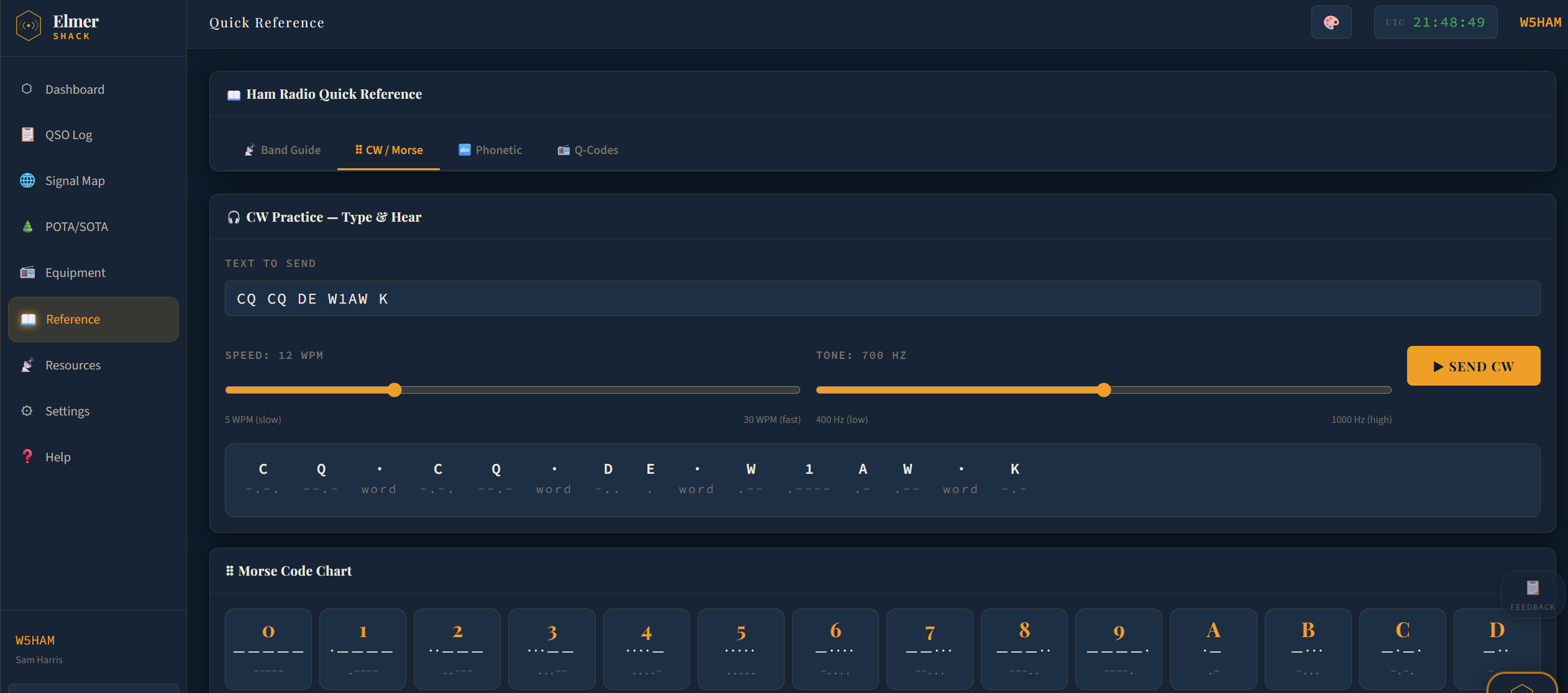
A built-in reference page so you don't need to leave the app to look something up. Q codes (with plain-English meanings — QRM, QSB, QSY, QRP, QRO and the rest), the NATO phonetic alphabet, the US band plan color-coded by license class, and a clear RST signal report guide. The CW practice tool turns any text into Morse you can hear at any speed.
- Band Guide — US frequency allocations by license class
- CW / Morse — full Morse chart plus a "type to hear" practice tool
- Phonetic alphabet — NATO standard, always available
- Q-codes — every standard Q code with its plain-English definition
- RST signal report guide — what each digit actually means
- CW speed adjustable from 5 WPM (learning) to 30 WPM (contest-ready)
- CW tone adjustable from 400 Hz to 1000 Hz to match your own ear
- Each character displays its dot-dash pattern as it plays
Curated external resources
The Resources page is a curated link library so newer hams aren't left Googling for the right starting points. WSJT-X, JS8Call, fldigi, propagation tools, online learning, study guides, and other ham-essentials — organized and tagged.
- Editorially curated — links worth keeping, not a dump
- Each entry has a one-line description and a few tags (Free, Download, Online, etc.)
- Adds to as the beta evolves
Six themes for the way you operate
Most operators work in low light. The default is Shack Dark — easy on the eyes for long sessions. There's a light theme for daylight work, plus four character themes that run from "phosphor CRT nostalgia" to "vacuum-tube warm" to high-contrast accessibility.
- Shack Dark — default, recommended for most operators
- Shack Light — daylight / accessibility
- Night Green — phosphor CRT nostalgia
- Vacuum Tube — warm amber on deep brown
- Night Sky — dark with indigo accent
- High Contrast — accessibility, red accent
- Every theme passes WCAG AA (4.5:1) contrast for body text
Mobile-friendly — phone, tablet, or laptop
The whole app is responsive. On phones you get a bottom tab bar (Home, Log, Map, Equipment, Elmer) and a slide-out menu for the rest. On tablets the navigation auto-collapses. On a laptop you get the full grid. Add ElmerShack to your home screen on iOS or Android for a quick-launch experience that opens like an app.
- Bottom tab bar on phones, slide-out menu for everything else
- Tablet auto-collapse so the dashboard gets the room it needs
- Add to Home Screen on iOS & Android works today
- Full PWA install prompt + native iOS / Android apps planned for after beta
Elmer — your personal AI mentor
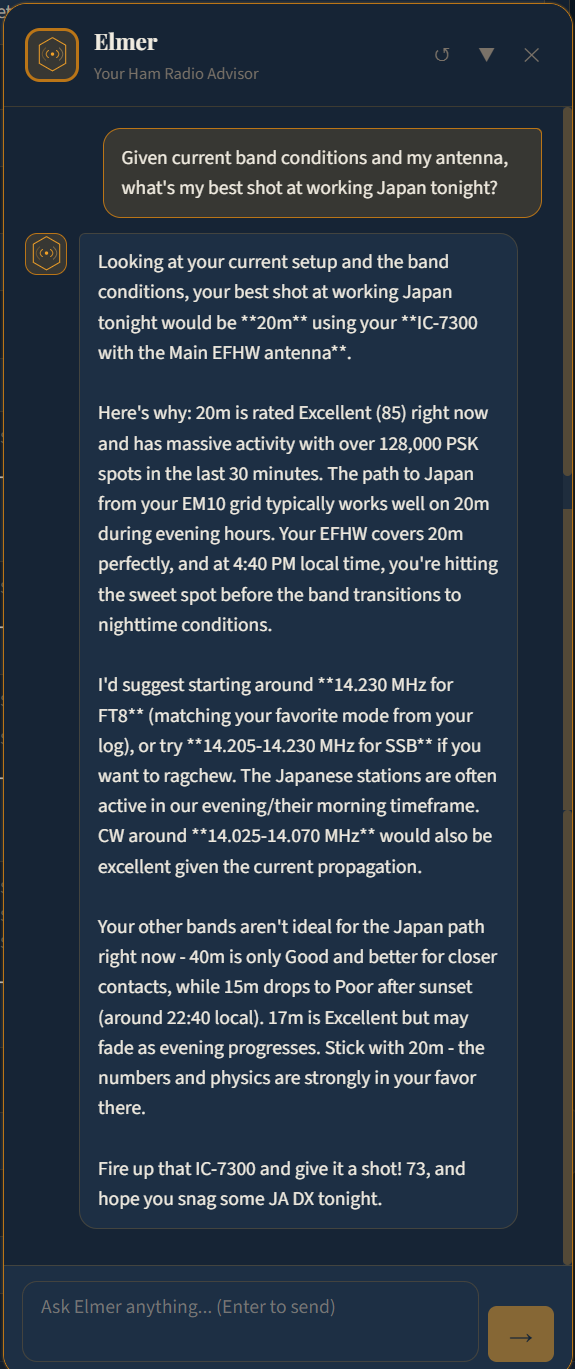
Named after the ham tradition of an Elmer — the experienced operator who takes a newer ham under their wing — ElmerShack's Elmer is an AI advisor built on Anthropic's Claude. He has full read access to your station context every time you send a message: callsign, grid, license class, every radio with its paired antenna, every antenna with its calculated resonant bands, accessories, current solar & band conditions, the physics-backed propagation forecast, recent PSK Reporter activity, your log profile, and your most recent contacts.
Every answer is specific to your station, not generic handbook advice.
- License gate: never recommend transmitting outside your privileges. Listening has no restriction.
- Antenna before band: if your radio has no paired antenna, suggest connecting one first.
- Conditions are law: ratings come from live data. Closed and Poor bands are never the primary recommendation.
- No guessing: if NOAA is unreachable, Elmer says so and refuses to recommend bands rather than making it up.
- Anti-fabrication: only cite mechanisms that are in the data. No invented ionospheric stories.
- Storm warning: when K≥5, Elmer leads every band reply with the storm warning.
- Specificity: name the radio, antenna, band, mode, and frequency. Bad: "try HF." Good: "try 40m CW on your IC-7300 with the EFHW around 7.025 MHz."
- Explain why: never just a recommendation; always the reasoning.
- Built on Claude Sonnet 4 — chosen for low-latency conversation and strict rule-following
- Live NOAA SWPC fetch on every message — no cache, no stale data masquerading as fresh
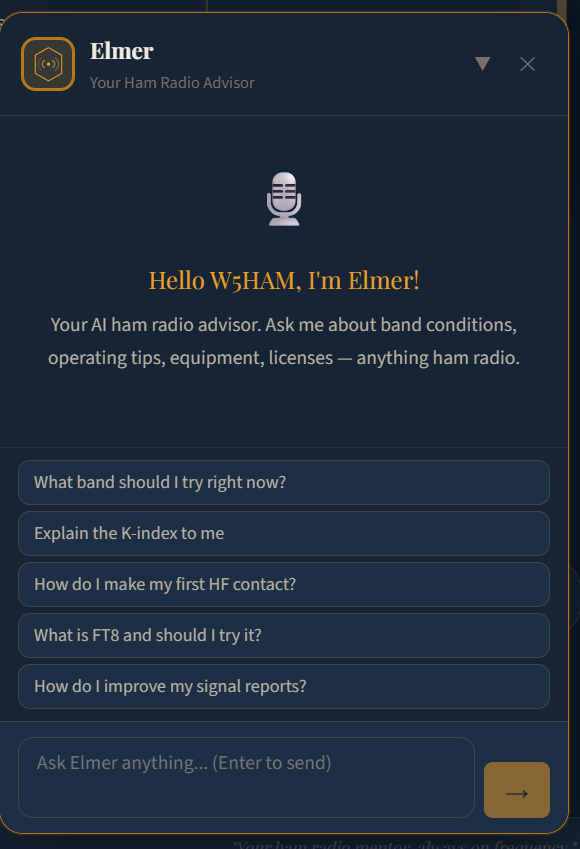
- Empty-state suggested questions for new hams: "What band should I try right now?", "Explain the K-index to me", "How do I make my first HF contact?"
- Persistent conversation history scoped to your account; clearable any time
- Floating chat panel available from every page on desktop; bottom-tab on mobile
- POTA/SOTA aware (when that workflow lands) — sees your active activation and helps you hit the QSO minimum
Ready to put it on your bench?
Free during beta. No credit card. Sign up and start operating smarter in five minutes.
Sign up free — try it out